



Free audio and video transcription
Free gives you 3 files a day, each up to 60 minutes, with speaker labels, the full editor and every export format. No card, and no trial clock.
Transcribe a recording
Launching November 2026
What the Free plan includes
Free has no end date and never turns into a bill.
- 3 files a day, each up to 60 minutes and 2 GB
- 2 uploads running side by side
- Speaker labels for up to 4 voices, the same switch paid accounts use
- The full editor, with synced playback, click-to-jump, find and replace and undo
- Every export format, one file at a time: TXT, DOCX, PDF, SRT, VTT, CSV and JSON
- 3 AI summaries a day, each with chapters and action items
Video counts the same way. A 45-minute screen recording is one of your 3 files for the day, and video to text lists every format.
Free transcription plans side by side
Here’s what Textspert and four other services give you for free, from each company’s pricing page.
| Service | Free allowance | Per-file limit | Source |
|---|---|---|---|
| Textspert | 3 files a day, every day | 60 minutes and 2 GB per file | Textspert pricing |
| Otter | 300 minutes a month, plus 3 file imports for the life of the account | Only the first 30 minutes of a conversation is readable | otter.ai/pricing |
| Notta | 120 minutes a month, with no export on the free plan | 3 minutes per conversation | notta.ai/en/pricing |
| Descript | 60 media minutes a month | 1 GB per file | descript.com/pricing |
| Fireflies | Transcription on Free, but downloading transcripts needs a paid plan | 2-hour recording limit | fireflies.ai/pricing |
Long files are where it shows. A 50-minute interview fits in one free Textspert upload. Of the services we checked, few let a free user transcribe and download a full 60-minute file: Otter’s free plan shows only the first 30 minutes, Fireflies needs a paid plan to download, and Notta Free transcribes up to 3 minutes per conversation. If you mostly record short clips, a monthly pool like Otter’s 300 minutes can suit you better. The comparison page goes rival by rival.
How to transcribe audio to text free
Make an account
Sign up with your email. No card, and nothing renews.
Add a recording
Pick an audio or video file up to 60 minutes and 2 GB, or record one from your browser.
Fix and download
Turn on Recognize speakers if several people talk, read it through, then export.
What Free doesn’t cover
- Paid files go first when the queue is busy, so on a busy day yours waits its turn.
- Free files and their transcripts are deleted after 30 days. Download what you want to keep.
- Exports go one file at a time. Bulk ZIP export is paid.
- Translation, Transcribe to English and chat with your transcript aren’t part of Free.
- A recording over 60 minutes won’t fit. Split it first, or buy an hour pack.
Where your free files live
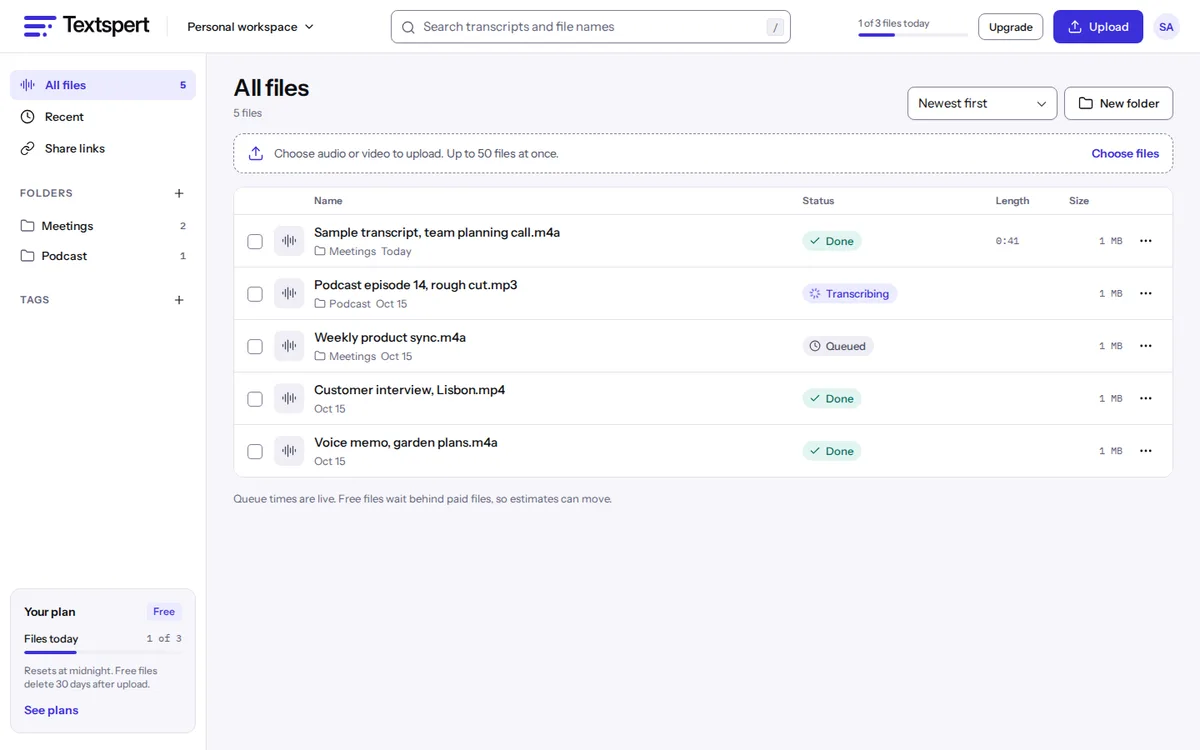
Everything lands in one files list, with folders, tags and search. Private share links work on Free too, with an optional expiry date and an off switch.
Your audio is never sent to any AI company, and we never use it to train a model. The private transcription page explains our training and deletion promises.
Free plan questions
Is Textspert really free?
Yes. No end date, no card, and 3 files a day of up to 60 minutes and 2 GB each.
Does free transcription include speaker labels?
It does. Turn on Recognize speakers at upload for labels on up to 4 voices, then rename them in the editor.
Can I transcribe video for free?
Yes. MP4, MOV, MKV, WEBM and other video files upload as they are, with the same 60-minute and 2 GB limits.
Why is my free file still waiting?
Paid files go ahead of free ones when the queue is busy. Yours keeps its place and runs after them.
What happens to my files after 30 days?
On Free, the file and its transcript are deleted after at most 30 days. Files on a subscription follow your current plan and any shorter retention setting, and if the subscription ends, Free’s 30-day limit can apply. Files paid from hour packs stay until you delete them, unless you choose a shorter retention period.
Can I export to Word or subtitles on Free?
Yes. DOCX, PDF, TXT, SRT, VTT, CSV and JSON are all included, one file at a time.
Other ways to start for free
- MP3 to textTranscribe MP3, M4A, WAV, FLAC and other audio files without converting them first.
- Video to textGet a transcript or SRT and VTT subtitles from MP4, MOV, MKV and other video files.
- Speaker identificationSee who said what, for up to 4 voices per file, then rename and merge speakers.
- Voice memo to textTranscribe voice memos and WhatsApp or Telegram voice notes from M4A, OGG or OPUS files.
- CompareTextspert next to TurboScribe, Otter, Rev, Descript and more, with sources.
Compare plans on the pricing page, or read our short privacy promises.
Join the waitlist
Launching November 2026. Be first to hear when Textspert opens.
We'll only email you about the launch. Unsubscribe anytime. Privacy