



Interview transcription
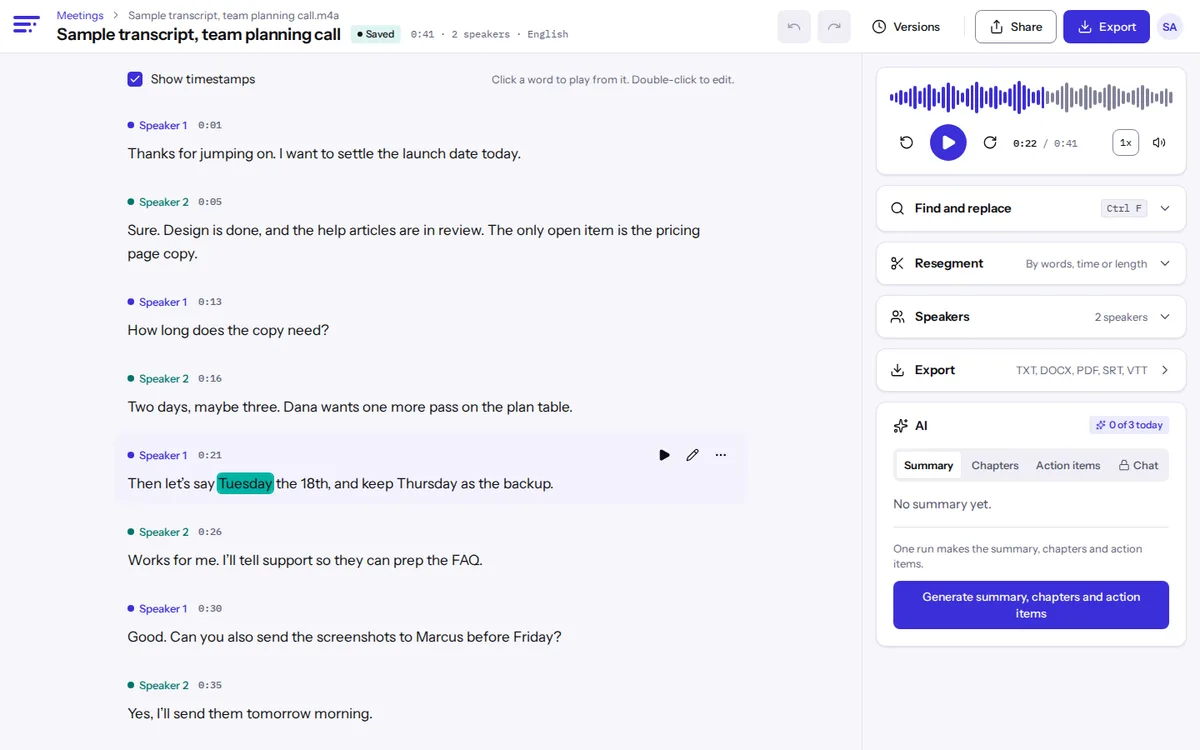
Every line carries a speaker label and a timestamp, and it stays tied to the recording. Check any quote against the tape before it goes to print or into your findings.
Transcribe a recording
Launching November 2026
Reporters: hear the quote before you print it
Treat the transcript as a map of the tape. When a line matters, click it. Playback jumps there and each word lights up as it plays, so you hear the tone and the sentence around it, not only the part you pulled.
- Search a phrase you half remember and jump straight to it, even in a two-hour sit-down.
- Fix a misheard word inline. Its timestamp stays put, so the line still plays from the right spot.
- Export DOCX with timestamps on, and your editor can check any quote against the clock.
- Rename Speaker 2 to your source once, and every line updates.
Machines mishear names, numbers and strong accents. A quote is unconfirmed until you’ve heard it yourself.
Researchers: recordings to coded data
Qualitative work ends up in spreadsheets and coding software. The CSV export gives one row per segment with start time, end time, speaker and text, and most analysis tools import it as is.
Name participants with codes
Rename speakers to P01, P02 or Interviewer before you export, and real names never reach your dataset.
Group the study
Give each study its own folder and tag files by site, wave or condition. Search then finds a phrase across every interview in the project.
Export CSV, then delete
Once the transcript is checked and exported, delete the recording and its transcript. If your protocol says data goes after analysis, set files to delete on a schedule.
We delete your original upload after transcription and keep a compressed audio copy for playback while the file is in your account. Delete the file and the copy goes with it.
Phone, video call or a recorder on the table
Phone recorder app
iPhone Voice Memos saves M4A, and Android recorders usually save M4A or MP3. Upload it as is; there’s nothing to convert. See voice memo to text.
Video call
Record in Zoom, Teams or Meet, download it, and upload the MP4 or the audio-only file. Meeting transcription shows where each app saves it.
Field recorder
WAV and FLAC from a handheld recorder work directly, with no converting. Paid plans take files up to 10 hours, so a long session fits in one upload.
Panel or focus group
Up to 4 voices per file get labels. A bigger group will share them, so plan to reassign some lines, or put a recorder on each table.
Record it clean, fix less later
- Put the recorder between you, a little closer to the quieter speaker.
- Pick a room with soft furniture. Echo hurts a transcript more than people expect.
- Let answers finish before you jump in; overlapping voices confuse the labels.
- Ask people to say and spell their names at the start. Cleanup gets much easier.
- For an interview in another language, pick it at upload instead of trusting detection, especially if the first half minute is small talk. We cover 100 languages.
Interview transcription questions
Can I check a quote against the recording?
Yes. Click any word and playback starts there, with each word lighting up as it plays, so you can follow along line by line.
Can I export an interview transcript to Excel?
Export CSV. Each row holds start and end time in milliseconds, the speaker and the text, and Excel, Google Sheets and most coding tools open it.
How many people can be in the interview?
Up to 4 voices get their own labels. Beyond that, some people share a label, and you fix those lines by hand.
Can I keep names out of the transcript?
Rename speakers to codes like P01 before you export, and use find and replace for names said out loud. The export then carries only the codes.
What happens to the recording after I’m done?
Delete it whenever you like, or set files to delete on a schedule. Free files delete after 30 days regardless.
Is the transcript good enough to quote without listening?
No. It’s a strong first draft, but machines miss names, numbers and words said over each other. Listen to every quote you publish.
Related pages for interviews
- Podcast transcriptEpisode transcripts with hosts and guests labeled, plus draft chapters for show notes and YouTube.
- Legal transcriptionPrivate draft transcripts of interviews, calls and hearing audio, clearly not certified.
- Speaker identificationSee who said what, for up to 4 voices per file, then rename and merge speakers.
- Voice memo to textTranscribe voice memos and WhatsApp or Telegram voice notes from M4A, OGG or OPUS files.
Compare plans on the pricing page, or read our short privacy promises.
Join the waitlist
Launching November 2026. Be first to hear when Textspert opens.
We'll only email you about the launch. Unsubscribe anytime. Privacy